

Last updated: Jul 29, 2026
You sat down to watch "just one video." Somehow, ninety minutes disappeared. You have a blanket all over your body, a warm phone in your hand, and you can’t even begin to recall the last ten videos that you have watched on TikTok. You didn’t swipe through most of them. The videos just kept rolling in. This is because of the TikTok auto-scroll feature, a simple toggle that takes away the only action that used to make you hesitate.
This isn't another "here's the settings menu" guide. This is about what actually happens to your thumb, your attention, and your evening once that switch is flipped, backed by TikTok's own product documentation, published research on attention and reward, and a simple experiment you can run on yourself tonight.
TikTok auto scroll is one of many TikTok features that automatically advance your For You feed to the next video after a video finishes, without you needing to swipe up. Instead of your finger driving the feed, the app drives it for you. Here is an explained method of how to turn on auto scroll on TikTok with 2 simple steps.
Long-press the video playing on your feed.
A menu will appear on screen; look for auto scroll and tap the toggle to turn it on.
There is also a category of third-party "auto scroll" browser extensions that work with TikTok's desktop web player; these are unofficial apps developed by others and do not use TikTok's original playback logic.
Practically, TikTok autoplay doesn't change anything about the video you see; it just makes you skip the step of swiping. The video recommendation algorithm that suggests the next video for you is still the same, no matter how you do it, whether by swiping or by Auto Scroll. The only thing that changes is the trigger: the app gets the signal from you that you want the next video not via a swiping gesture anymore, but via the end of the video.
Every video that is auto-advanced is counted like any other manually seen video. All valid TikTok views will be considered even in the auto mode. Watch time, replays, and skips still count toward your profile’s engagement signals. Turning on Auto Scroll doesn't opt you out of being measured.
Every manual swipe is a tiny decision point. Your thumb has to move, which means your brain gets a half-second window to ask, even subconsciously, "do I want another one?" Behavioral designers call this kind of pause a point of friction, a small cost that interrupts autopilot. Auto Scroll deletes that cost entirely.
This matters more than it sounds like it should. Reducing the physical effort of a behavior increases how long people keep doing it, simply because there's no natural exit ramp built into the process anymore. On a manually-scrolled feed, getting bored is usually what makes you stop. On an autoplay TikTok feed, getting bored doesn't stop anything; the next video is already loading.
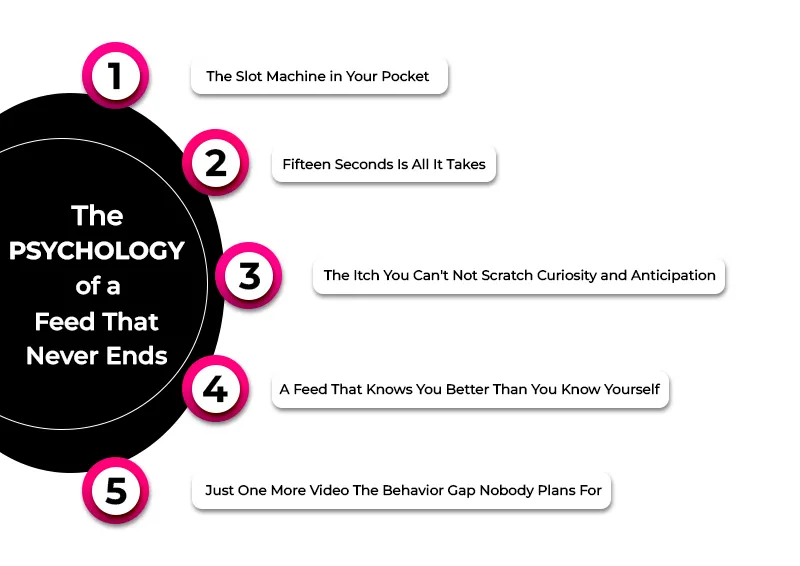
Psychologists describe TikTok-style feeds as running on a variable ratio reinforcement schedule, the same reward structure that makes slot machines so hard to walk away from. According to a Psychology Today analysis of this "Vegas effect" on screens, dopamine is released less in response to getting a reward and more in anticipation of maybe getting one, which is why unpredictable reward timing produces far more persistent, repetitive behavior than a reward you can always predict.
The loops of short-form videos mean that "one more" becomes virtually free. A 15- to 60-second video is not long at all, and there is always enough time for one more loop until you absolutely have to stop. Auto Scroll strips out even the decision of whether the TikTok viewer wants to watch that next short clip.
Each new video is an unopened box. You do not know at first whether it will make you laugh, help you, or even be memorable. The only motivating part of that is that gap which you have to fill to know. That gap comes up again and again thanks to Auto Scroll.
TikTok’s own newsroom describes the workings of the For You feed as ranking videos based on what you like and dislike, with no two feeds being alike as the algorithm keeps adapting to your TikTok likes and dislikes each time you refresh the feed. The more personalized your For You feed becomes, the harder it will be for you to determine when you are going to stop TikTok scrolling, because the app is quite literally engineered to keep guessing right.
There is sometimes a significant difference between what users plan to spend time on the app versus what they actually spend. According to Pew Research Center's 2025 survey of U.S. teenagers, 21% said their TikTok use is "almost constant," an increase from 16% in 2022.
According to TikTok's official explanation of how the For You feed works, recommendations are ranked using a combination of signals: the accounts you follow, the videos you like and share, the comments you leave, how long you watch, whether you rewatch a clip, and what you actively skip or mark "not interested." None of these signals operate on their own.
The system constantly recalculates all of these signals in relation to each other while you continue to use the app. Time spent and rewatches hold outsized importance, and this is precisely why those attempting to increase TikTok watch time fixate on the hook within the first couple of seconds.
Every TikTok like, comment, share, or even skip you perform on TikTok represents a vote that shapes tomorrow’s feed. If you make content yourself, the same behavioral signals you track when you try to increase TikTok followers. These signals are completion rate, replays, and shares; the exact inputs auto scroll quietly feeds back into your own viewing profile every time you don't lift a finger.
Neither mode is universally "better." They trade off different things, and which one fits depends entirely on what you're using TikTok for in that moment.
Factor |
Auto Scroll |
Manual Scrolling |
|
Awareness of time passing |
Lower, no physical cue reminds you time is moving |
Higher, each swipe is a small checkpoint |
|
Effort required |
None; hands-free by design |
Small, repeated physical action |
|
Speed of skipping disliked content |
It can feel slower |
Instant, one swipe moves on |
|
Natural stopping cues |
Very few; feed keeps moving on its own |
Built in; boredom or fatigue naturally ends a swipe |
|
Best suited for |
Hands-busy moments: cooking, folding laundry, working out |
Active browsing, focused entertainment, deliberate breaks |
|
Risk of losing track of time |
Higher, based on the loss of a natural exit point |
Lower, though still present with an engaging feed |
The honest answer is that it depends on context, not on the feature itself. A peer-reviewed review published in a PMC-indexed neuroscience journal found that liking and social-reward behavior on these platforms activates the brain's striatum, a core reward region, with activation intensity rising alongside subjective pleasure. That's not evidence of harm on its own; dose-dependent reward activation is how plenty of enjoyable, healthy activities work too.
What tips the balance toward harm isn't the dopamine response itself, but what Auto Scroll removes: the natural stopping points that let you notice you're tired, that it's late, or that you meant to be doing something else. TikTok's own actions are a useful signal here. The company has spent the last several years building out a dedicated Time and Well-being space, Screen Time Management with a passcode-lockable daily cap, and default screen-time prompts for teenagers, moves the company frames as helping people "feel in control" of their experience. A platform doesn't build friction back in unless it has noticed the frictionless version can run away from people.
It's worth separating an ordinary habit from a pattern worth paying closer attention to. A habit is a behavior triggered by a cue, boredom, a notification, or a spare thirty seconds in line, that you could stop if you noticed it and chose to. It becomes something more worth examining when it keeps happening despite you wanting it to stop.
And especially when it displaces sleep or responsibilities, or when reaching for the app happens before you've consciously decided to. "Social media addiction" isn't a formal clinical diagnosis, so this isn't about labeling yourself; it's about noticing patterns early enough to still have a choice in the matter.
You regularly watch longer than you planned to, even when you set an intention beforehand.
You're losing sleep because "one more video" turned into another hour.
You've tried to stop mid-session and genuinely struggled to put the phone down.
You open TikTok automatically when bored, without deciding to.
Time flies, or you lose track as you scroll through your feed.
Your anxiety levels rise if you are unable to access the app.
You continue to scroll long after the content stops becoming entertaining.
Because this feature has rolled out gradually and isn't identical for every account, try both of these paths:
Press and hold on any video in your For You feed.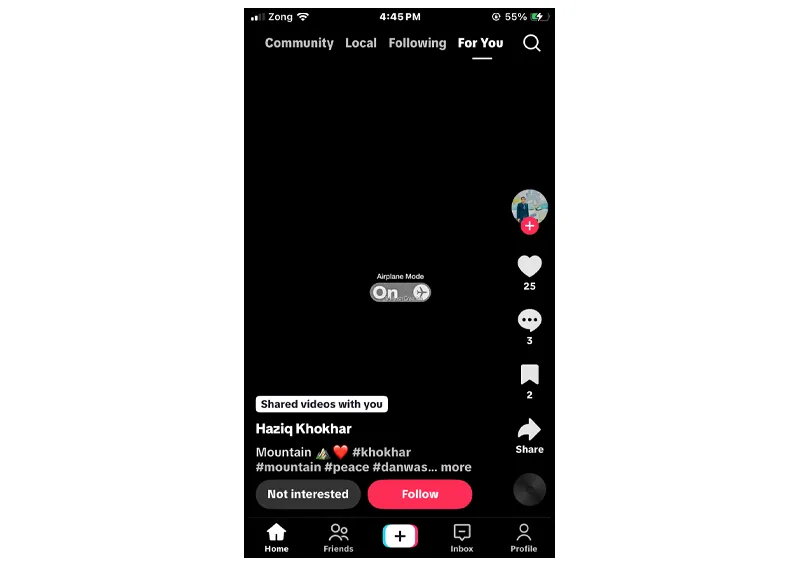
Look for the Auto Scroll option in the share/action menu that pops up.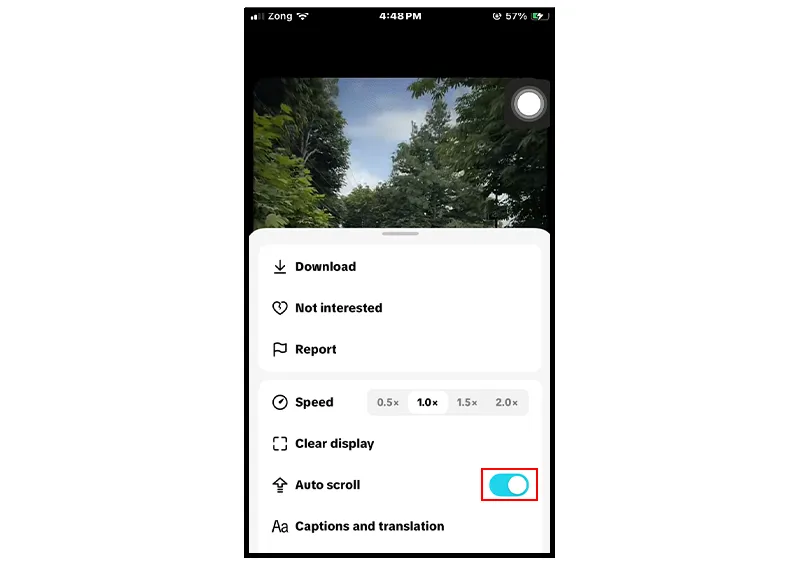
Tap to toggle it off from there.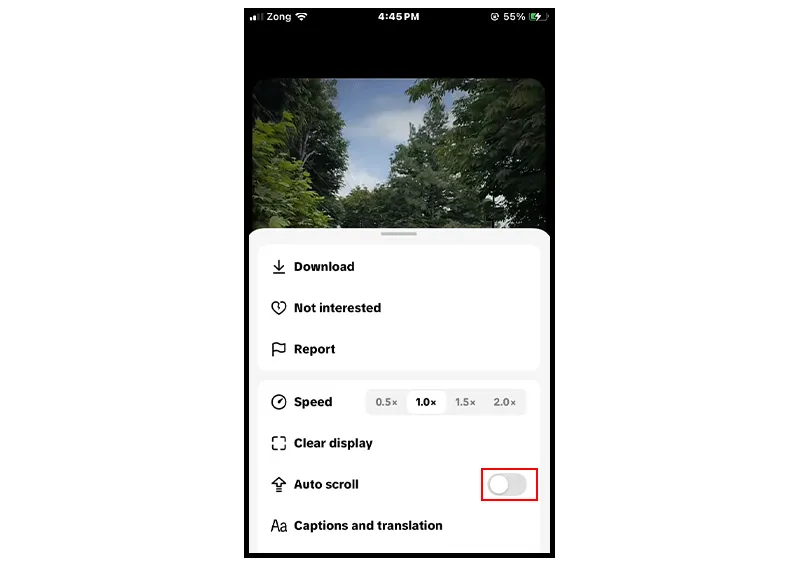
TikTok auto scroll iPhone specifically can be combined with the hold-to-pause gesture (press and hold anywhere on a video) as a manual override even while Auto Scroll is active.
Uneven rollout: TikTok has done a staged rollout of the feature inconsistently across accounts, regions, and even versions of the application, so it’s possible that the toggle just isn’t on your account yet.
Outdated version of the application: make sure you’re using the most recent version of the application, which is available via the App Store and Google Play.
Interference by other accessibility settings: settings such as Reduce Motion (iOS) might conflict with auto-advance animation.
Inadequate connectivity: auto-advance depends on the next video being buffered; poor connectivity will cause it to fail.
Corrupted application cache: restarting the application or even uninstalling and reinstalling it works for many users.
Situation |
Turn Auto Scroll ON |
Turn Auto Scroll OFF |
|
Hands busy (cooking, exercising, folding laundry) |
✔ |
|
|
Trying to fall asleep or wind down |
|
✔ |
|
On a short, deliberate break at work or school |
|
✔ (use a timer instead) |
|
Background entertainment while doing a passive task |
✔ |
|
|
You've noticed sessions running longer than planned lately |
|
✔ |
|
You want to actively curate and skip content quickly |
|
✔ |
TikTok auto scroll isn't secretly malicious, and it isn't harmless either. It's a design choice that removes friction, and friction happens to be one of the few things standing between you and losing an evening you didn't mean to lose. The feature works exactly as intended: shorter path from one video to the next, powered by a recommendation system that's genuinely good at guessing what you'll want to see.
What matters most isn't whether Auto Scroll is switched on or off in general; it's whether you decided that, on purpose, for the moment you're in. Used with intention, during a workout or while your hands are covered in flour, it's a convenience. Left on by default at 11 p.m. with no plan to stop, it's something else. The tools to notice the difference already exist, inside the app and inside the small experiment above. The rest is just remembering to use them before the next video autoplays.
It happens because of unpredictable rewards that keep your brain anticipating the next video, and a recommendation system built specifically to match your interests more precisely the longer you watch.
Once enabled, yes, it advances to the next video without a swipe.
TikTok has rolled it out to both platforms, but availability has been staggered by account, region, and app version, so it may show up for one device before another.
It can increase overall data use simply because it removes the pause that used to happen between videos, meaning more content plays automatically in the same span of time.
Yes, removing the swipe removes a natural moment to check the clock, which is a large part of why time spent tends to run longer with Auto Scroll on than with manual scrolling.
To make a TikTok slideshow play and move automatically, choose video mode instead of photo mode when uploading multiple images. The image slideshow format is not supported by the platform during auto scroll.
Press and hold the video to bring up the action menu and toggle Auto Scroll off from there.
Table of Content

Jordan Calloway
Jordan Calloway is a social media growth strategist with seven years of expertise in TikTok content optimization, monetization, and algorithmic research. Having worked directly with brands and independent creators across the USA and UK, Jordan focuses on strategies that produce measurable results, not vanity metrics. This page reflects both platform research and real-world testing from working inside active TikTok growth campaigns.
Open TikTok right now, and you're joining a scroll that never stops, literally. Somewhere between th...
If you have scrolled through TikTok for longer than five minutes, then you must have noticed that th...

TikTok started its first monetization program in July 2020. Before that, picking up a camera and tal...
Want to grow on TikTok but don't know how? LikesForYou will help you to give your TikTok the glow it deserves.

NOW ENJOY DISCOUNT ON EVERY PURCHASE
