

Last updated: Sep 01, 2026
In 2026, not every post on TikTok is a video anymore. Sometimes, a good TikTok text post can make a scrolling thumb pause just as well as a flashy video. This is due to the fact that the post seems authentic, but it is not a performance. If you have ever wondered how to post on TikTok with text or why content creators often mention the TikTok cover title feature, you are in the right spot.
This guide will explain to you how to create TikTok text posts in two formats. First is the classic text-only version that was introduced back in 2023, and the second one is the cover title option that completely revolutionized the thumbnails on the app in 2026. In addition, you will learn some useful tips for posting text on TikTok and get some ideas for your text posts.
As the name suggests, a TikTok text post is simply one that uses just words and does not need the camera roll at all. TikTok came up with this idea in July 2023, and the process remains the same today. You navigate to the camera page and, instead of recording, you swipe to "Text."
TikTok joins other platforms such as X (Twitter), Facebook, Threads, Instagram Stories, and Tumblr in embracing text posts as the core part of their formats. However, unlike in the case of these other social media platforms, text posts on TikTok allow you to add emojis, give you background templates, and even sound. Moreover, it offers options like enabling comments and duets, so a TikTok post made of nothing but text still behaves like app-native content, not an afterthought.
One of the most undervalued TikTok features is plain TikTok text styling. This may not seem like much, but it holds a lot of merit. On any other platform, text-based updates simply sit quietly at the bottom of your feed. On TikTok, a post written in pure text will go through the same For You algorithm as anything else on the platform if it's written the right way.
If you're asking how to post text on TikTok for the first time, the process takes less time to do than it does to read about:
Open TikTok and tap the + button at the bottom of the screen, the same button used for a video. Slide the mode selector until you reach Text.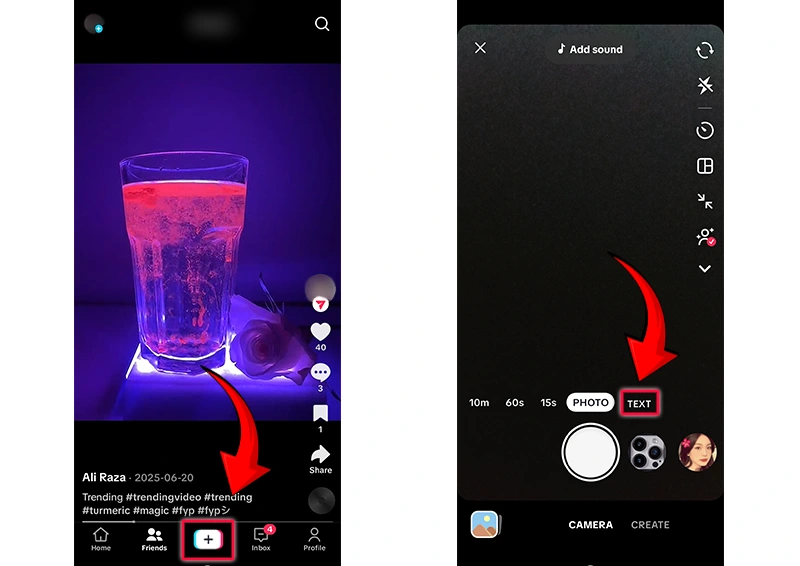
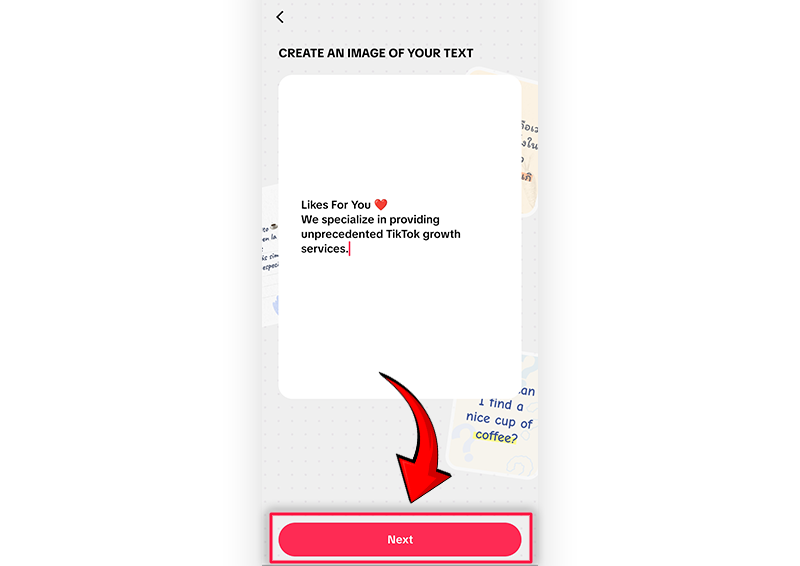
In this step, you can add trending audios or any song you like. Moreover, you will be given a variety of templates for the background. Tap “Next” again.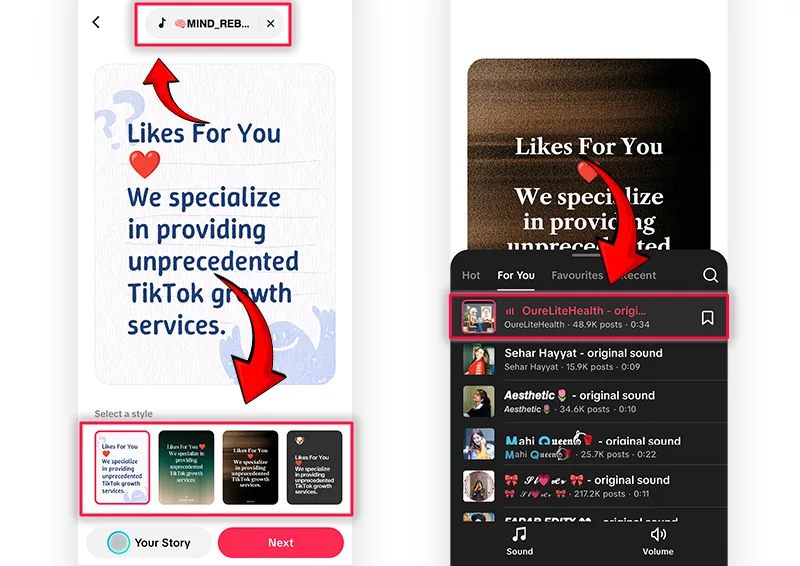
Now you can add a caption for the post, trending hashtags, location, and decide whether to allow comments, duets, or stitches; this is where a lot of engagement actually happens.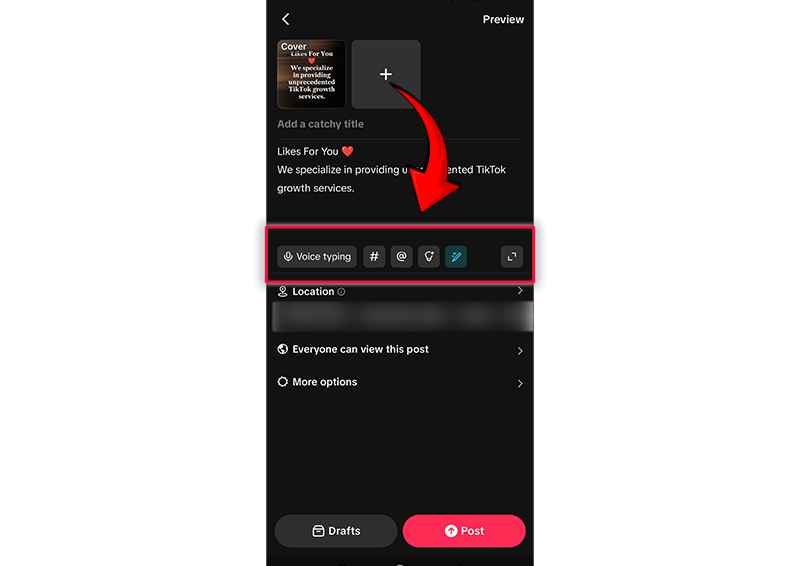
Tap Post, and it's live.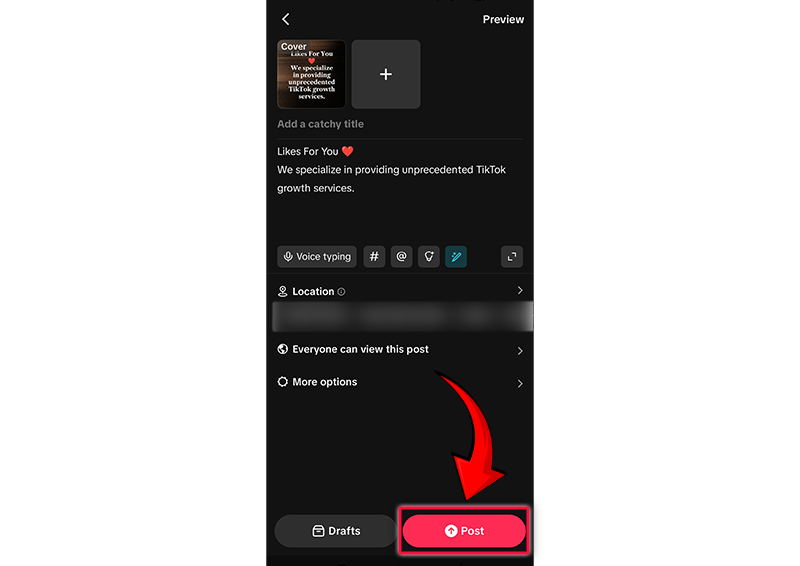
That's the entire mechanic behind how to post on TikTok using text. The real skill isn't in the buttons; it's in what gets typed before they're tapped, which is really the whole point of this guide.
A blank canvas is intimidating. These TikTok text post ideas are proven starting points, the kind recognizable from text posts on TikTok that end up on almost everyone's For You page:
The unfinished thought. Post half an opinion and let the TikTok comments finish it. Nothing drives replies like something that begs to be argued with.
The relatable confession. "Things I do that I will never admit to in real life" style posts thrive because everyone secretly agrees.
The mini list. Three or four short lines, each landing a small punch — easy to screenshot, easy to share.
The countdown or update. Launch dates, streak counts, or "day 47 of trying to..." posts build a returning audience.
The direct question. Simple, but effective, because TikTok's comment section is where most of the real engagement lives.
Seeing the format in action helps more than any list of tips. A few TikTok text post examples worth studying, in structure if not word for word:
A single blunt sentence like "no one warns you that your late twenties are just admin," short, universal, arguable.
A numbered mini-guide: "3 signs you're burnt out and calling it 'being busy.'"
Soft launch: “We have a new product coming up next week. Guess what it is!”
Opening for a story-time: “So here’s something my workmate did today which I really need to tell you.”
Notice what they share: no wasted words, a clear emotional angle, and an obvious reason to comment.
While text posts have been around for a few years, the TikTok cover title feature is the newer addition, and it's worth understanding on its own. In 2026, TikTok has allowed creators to add titles straight on top of a video’s cover image, and the title is also shown on the profile grid, which makes it easier for anybody landing on it to figure out what the video is all about.
This way, a profile grid becomes more like a magazine rack than a photo album. Instead of guessing what a video is about from a blurry freeze-frame, visitors read a short, punchy line the creator wrote themselves. And that line does a lot of the persuading before the video even starts playing.
One creator-focused publication put it plainly: the cover title is a distribution window that exists while the feature is new, worth taking advantage of, but what sustains the result long-term is the title being honest and matching the video. In other words, the TikTok cover title feature can earn a temporary boost, but it won't rescue a video that fails to deliver on its own promise.
You need not sacrifice one for the other. A text post carries its bold opening statement as its hook, while you may have your video post cover titles to maintain consistency in your grid. If you look at creators who make use of both the TikTok text posts feature and cover titles and think of them as a connected system with the same voice and the same promise, the profile comes off as more deliberate than just random.
Text posts aren't a replacement for video, and treating them that way is one of the format's real limitations. They're not exactly as close to the video post as to the image because TikTok uses a background canvas to create these types of posts, and the range of options is less than that on Instagram. In case the idea requires a specific tone of voice, demonstration, or visual revelation, it’s better to figure out how to make a TikTok video than to force the idea into the text format.
A simple tip: if the idea can work well as a caption to the photo, then it’s a text post. Otherwise, if the face, hands, and even a product need to perform some actions, the idea fits better into a video. Combining both types of posts weekly helps keep a profile diverse, and such an approach goes well together with the general strategy of how to get more TikTok followers, rather than chasing a single viral post.
No format is a shortcut, and it's worth being honest about the trade-offs. Posts in the form of text tend to receive less audience than video because TikTok users are already used to watching video content on the feed, so they might need more time to get used to text posts. Another problem with text posts is that they cannot express nuances in the same way as voice could.
However, this solution is not difficult: post only those concepts that require text format, keep posts short, and do not be afraid to make a video that complements a textual idea. Such a combination helps boost engagement on TikTok better than the single format used separately.
A text post lives or dies in its first line; the algorithm gives it a second, maybe two, before a thumb moves on. Several things make a text post succeed or fail in being visible on the feed:
Keep sentences short enough to be perceived in one glance, not during a pause.
Use the cover title feature to describe videos that accompany the post and thus create a consistent narrative on the grid.
Turn comments on; a TikTok post without conversation is a post without momentum.
Post when the target audience is online, not at any general "best hour"; testing against real best time to post on TikTok data beats copying someone else's schedule.
Answer comments in the first hour after posting since answering is an act of engagement itself.
Gaining more TikTok likes on a text post is no different from gaining likes on other kinds of posts and is all about giving people the motivation to like in the first sentence, not in the third one.
In Conclusion, text posts prove something video-obsessed creators sometimes forget: attention doesn't always need motion, sound, or a perfect edit. Sometimes it just needs a sentence honest enough to make someone stop scrolling. Between a sharper TikTok text post and a well-written TikTok cover title feature on your videos, there are now two distinct ways to earn that first half-second of attention, the hardest half-second on the entire app.
The creators who matter most in 2026 probably won't be the ones with the fanciest editing. They'll be the ones who learned to write as they talk, post consistently, and let the format fit the idea instead of forcing it the other way around. Try one text post this week, written the way you'd actually say it out loud, and see what happens.
Table of Content

Jordan Calloway
Jordan Calloway is a social media growth strategist with seven years of expertise in TikTok content optimization, monetization, and algorithmic research. Having worked directly with brands and independent creators across the USA and UK, Jordan focuses on strategies that produce measurable results, not vanity metrics. This page reflects both platform research and real-world testing from working inside active TikTok growth campaigns.

If you've been posting on TikTok for months and your follower count looks fine, but your bank accoun...
You’re not going crazy because your follower count hasn’t increased during the past year...
You go live on TikTok. Fifteen minutes pass, and the viewer count is still stuck at 2. So you do wha...
Want to grow on TikTok but don't know how? LikesForYou will help you to give your TikTok the glow it deserves.


NOW ENJOY DISCOUNT ON EVERY PURCHASE
