

Last updated: Oct 28, 2026
You go live on TikTok. Fifteen minutes pass, and the viewer count is still stuck at 2. So you do what every TikTok LIVE tips post tells you, like fix your timing, rewrite your hook, promote harder, change your format, boost engagement. All at the same time. That's like taking five different medicines for a symptom you never actually diagnosed. A few days later, nothing's changed, and now you don't even know which fix helped, because you never figured out what was actually broken.
Here's the part nobody tells you: why is my TikTok live not getting views? isn't one problem. It's two very different problems that just look the same from the outside. Either people aren't showing up at all, or they're showing up and leaving fast. And the fix for one won't help the other; it might even make things worse. So before you touch your hook, schedule, or promotion, there's a faster way to find out which one you're dealing with: go live twice, once short and once long, and let the numbers tell you if this is a reach problem or a retention problem. Everything you do next should come from that answer. Let’s proceed.
When you run into a TikTok live no viewers problem, most creators treat it as one concern, but it actually isn’t. Sometimes the stream never pushes to anyone's feed at all because the algorithm simply doesn't show it, and you end up with a TikTok live not getting on FYP situation without knowing why.
Other times it does get pushed, but people scroll past or tap in and leave in seconds. These are two completely different failures. One, we can say, is a discovery problem. The other is the hook and retention problem, and confusing the two is why the usual advice doesn’t fix anything.
Run two lives back to back and treat them like an experiment:
Test 1: Go live for a short burst, about 10 to 15 minutes, just to get a quick read.
Test 2: On a different day or time, go live again for a longer stretch, somewhere around 45 to 60 minutes.
Changing the length and timing this way gives you two different data points instead of one, so you're not judging your whole channel off a single stream.
While you're live, keep an eye on TikTok's Live Analytics inside TikTok Studio, since that's where your real-time numbers live. Four numbers matter here: 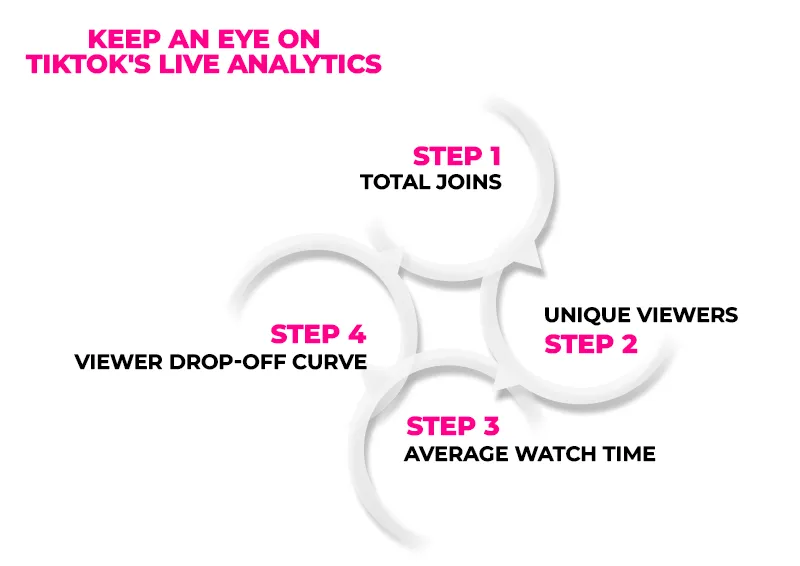
Total joins — how many people tapped in overall.
Unique viewers — how many actual different people, not repeat counts
Average watch time — how long people stick around once they're in.
Viewer drop-off curve — where in the stream people are leaving.
None of this happens in a vacuum either. TikTok users upload roughly 16,000 videos to the platform every minute. That's the scale of competition your stream is up against for a spot on the FYP, so getting surfaced isn't just about your content quality, it's about the algorithm choosing you over a constantly refreshing pool of content happening at the exact same time. So lets say your numbers came back and nobody’s joining. Here’s what’s actually going on, and what to do about it.
You're not getting surfaced to your own followers: TikTok doesn't push live notifications to everyone who follows you, only to a subset it thinks will engage
You're not appearing on the FYP or LIVE feed: The algorithm hasn't decided your stream is worth showing to non-followers yet.
No pre-live notification pickup: If you go live without warming up the algorithm first, the notification often doesn't fire in time for people to catch it
Inactive posting history: If you haven't posted or gone live recently, TikTok deprioritizes your distribution across the board, live included.
TikTok Live's Chat category alone averaged over 2.2 million concurrent viewers, with peaks surpassing 4 million. That's the level of competition your stream is up against for a spot on the FYP, so getting surfaced isn't just about your content; it's about the algorithm choosing you over a genuinely massive pool of live streams happening at the same time.
Post a teaser video 30–60 minutes before going live: Not a random clip, something that directly tells people you're about to go live and gives them a reason to tap the notification when it comes.
Go live during your followers' known activity windows: Check when your regular posts get the most engagement, and go live inside that window, not outside it.
Stack consistency to get more TikTok livestream views: Post at least one regular video in the 24–48 hours before going live; a cold account gets throttled distribution across the board.
Engage right before going live: Commenting or reacting on other lives in your niche minutes before you go live can nudge LIVE Center placement, since TikTok factors in recent activity signals.
If you're still not seeing movement after trying all of this consistently, some creators turn to services like Buy TikTok Live Views to kickstart visibility, though this should be treated as a short-term nudge, not a substitute for actually fixing the reach problem underneath.
So let's flip it: your numbers show people are joining just fine, but they're bouncing within the first minute or so. That's not a reach issue anymore; that's what's happening once they're actually in the room. 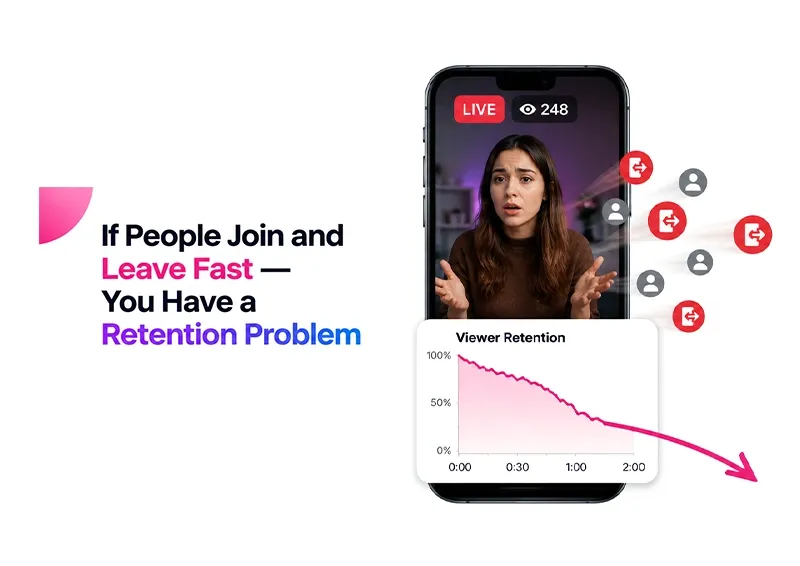
Weak first 30 seconds: If a new joiner doesn't immediately understand what's happening or why they should stay, they leave before you even notice they arrived
Dead air: Silence, fumbling, or "just setting up" moments feel like nothing's happening, and TikTok Live has zero patience for that.
No reason to stay: If there's no clear hook, topic, or payoff being built toward, viewers have nothing pulling them forward.
One-way broadcasting instead of interaction loops: If you're talking at the room instead of with it, people don't feel seen, so they don't feel invested.
Script your opening 15–20 seconds: Literally plan what you say the second someone joins, since joins are staggered and everyone's "first impression" is different
Create early comment triggers: Ask a quick, easy-to-answer question in the first minute so new joiners see live interaction already happening, which signals the room is active.
Pace content in "stay-worthy" segments: Break your live into small mini-moments (a question, a reveal, a mini-challenge) instead of one long stretch, so there's always a next reason to stick around.
Watch for audio/visual friction: Low volume, bad lighting, or a cluttered frame are things viewers react to instinctively without consciously noticing, and they'll just scroll off rather than figure out what's bothering them.
Small touches also help retention indirectly. Sending TikTok Live Gifts during quieter moments or acknowledging them on screen keeps the room feeling active, which encourages new joiners to stick around a little longer.
Once you know what's wrong, the next step picks itself. Got a reach problem? Post a teaser before going live, pick a time your TikTok followers are actually active, and drop a regular video beforehand so your account isn't cold. Got a retention problem instead? Tighten your opener, ask something early to get comments rolling, and break your live into small moments instead of one long stretch. Don't touch both at once; fix whichever one your test pointed to, then check again before changing anything else.
And sometimes it's cluttered: a few people trickle in but slower than usual, and even they don't stick around. If that's you, go after reach first, since there's no point polishing your opener if nobody's around to hear it. Get joins up, retest, then shift to retention. Try fixing both together, and you'll be back where you started, guessing again. Fixing this loop matters beyond just the views themselves too, as longer watch times feed directly into TikTok Monetization.
Putting it together, no views is not a mystery at all; it's just an unasked question. Most creators panic and start changing five things at once, hoping something sticks, and end up more confused than before. But there are only two things that can be wrong: either people aren’t seeing your live, or they're seeing it and leaving fast. Run the two lives, check your joins against your drop-off curve, and you'll know exactly which one it is. Once you know that, every fix you make actually means something, instead of being another guess thrown at the wall. Diagnose first, fix second, and the rest gets a lot simpler.
Visit LikesForYou if you are looking for organic TikTok growth services and enjoy a 10% discount on every single purchase!
It’s either a reach problem or a retention problem; run the two-live test to find out which one you're dealing with.
A sudden drop usually points to a reach issue caused by inactive posting or a break in your live schedule.
Post a teaser beforehand, go live during your followers’ active hours, and stay consistent with your postings.
You need at least 1,000 followers and to meet TikTok’s minimum age requirement to unlock Live access.
Yes, higher watch time and early interaction signal to TikTok that your live is worth pushing to more viewers.
If your TikTok Live isn't working, it’s typically a technical issue, so check your app version, connection, and account eligibility before assuming it's a views problem.
Wherever your followers are more active, based on your regular post engagement.
Yes, a short teaser video with a countdown timer 30 to 60 minutes beforehand helps warm up the algorithm and pull followers in.
Table of Content

Jordan Calloway
Jordan Calloway is a social media growth strategist with seven years of expertise in TikTok content optimization, monetization, and algorithmic research. Having worked directly with brands and independent creators across the USA and UK, Jordan focuses on strategies that produce measurable results, not vanity metrics. This page reflects both platform research and real-world testing from working inside active TikTok growth campaigns.
If you have scrolled through TikTok for longer than five minutes, then you must have noticed that th...
You often hear creators saying that engagement matters more than followers, but wait until you see t...
You spent days creating a piece of content, pondering on a hook, fixing the lighting and audio to th...

NOW ENJOY DISCOUNT ON EVERY PURCHASE
