

Last updated: Mar 31, 2026
TikTok has evolved way beyond just an entertainment platform; it has now become a marketing hub. The seamless integration of TikTok ads with other forms of content has made it easy to sell products and gain user attention. In this blog, we are going to break down everything you need to know to master TikTok advertising in 2026.
We will be going over why you should be using TikTok ads, step-by-step, how to get started and set up your accounts, proven ad strategies, how to avoid bans and restrictions, how to scale your ads, and most importantly, how to avoid all the common pitfalls and mistakes that beginners are making on the platform.
If you've ever been on TikTok, you've definitely come across the catchy ads that are seamlessly built into your regular feed of scrolling. These are paid promotions that brands are using to tap into TikTok's massive engaged user base.
Currently, there are 1.9 to 2 billion active users on the platform, and what's even more astonishing is that the average daily watch time per user is 95 minutes. Moreover, 40% of TikTok's active users are starting to make purchases directly through the app, and TikTok isn't just for Gen Z anymore. Brands of all sizes are benefiting from TikTok every day to reach new and highly profitable audiences.
TikTok can either be a goldmine or a complete money pit for your business. The first pro of using TikTok ads is that it's much more cost-effective than going to other platforms. TikTok users are more engaged than on any other platform, from basic things like liking and commenting, to purchasing, even from organic videos.
On top of that, the viral potential on TikTok is unbeatable. It's the easiest platform to start up, and within your first few days, you can get millions of views if you pop out a viral video. So if you're ready to get cheaper traffic, and you're not afraid of pouring more effort into your marketing, then TikTok ads are for you.
The first thing you need to do is set up and run your account. The following is the step-by-step process to create an ad account.
Visit ads.tiktok.com and click "Create an Account" or "Get Started".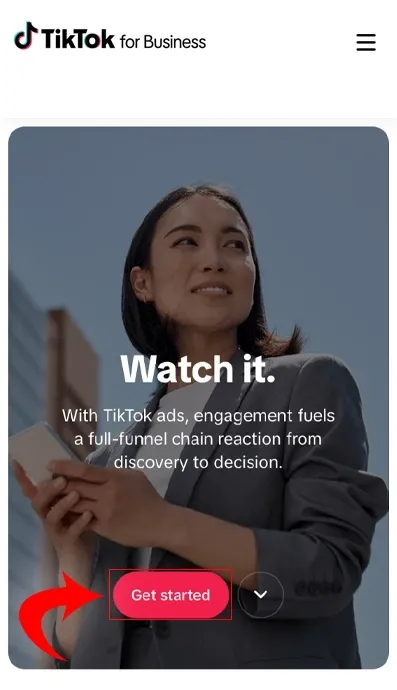
Sign up with email/password or link an existing TikTok account; verify via email code.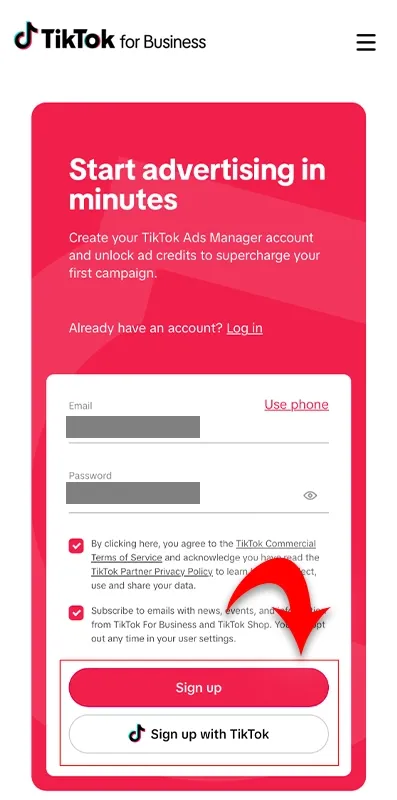
Enter your country, industry, business name, time zone, phone, and currency, then click Register.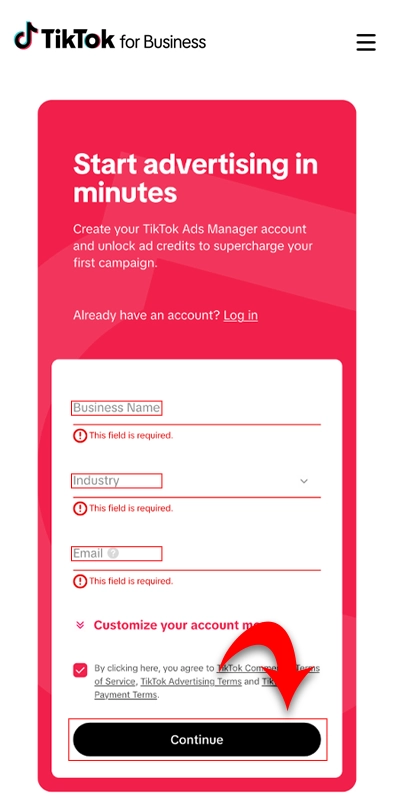
Add the website URL, full business address, and tax information to proceed.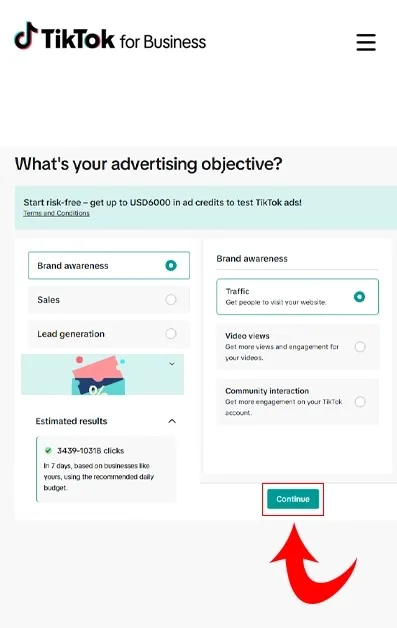
Set up payment by choosing a manual or automatic method; no charge will be deducted until campaigns run.
Review and submit for approval, which usually takes 1 business day.
If you're running a Shopify store, it's super easy to connect your pixel and start gathering all that data. On Shopify, they have a built-in TikTok integration, and by following their step-by-step process, you'll be able to set up your TikTok pixel in less than a couple of minutes. And just like that, your account is all ready, set up, and your pixel is ready to track your conversions. And by looking at the pattern, you can increase TikTok views by making alterations to strategies.
Now, it's time to create your first ad. So once you're in your ads manager, all you have to do is click “create” and choose website conversions to optimize for purchases. Name your campaign something easy for you to remember, possibly just the product or offer that you're testing, and then go ahead and choose conversion and set up the goal as purchase.
You can also upload seven to ten different creative assets to maximize algorithmic testing and gain TikTok followers. TikTok is a very creative heavy process, so you must stock up on as much footage of your product as possible and then start mixing it and creating ads. Add a few simple ad texts, such as “50% off plus free shipping,” or whatever correlates best with the offer.
It is recommended to start with a budget of $50 to $100 per day. It might take you a couple of days to get a solid amount of data before you start making informed decisions, but it's definitely best to ease in, as this is a new platform you'll be advertising on.
If you start with the above-mentioned budget, you can upload seven to ten creatives. After learning how to advertise on TikTok and running the ads, you'll likely want to wait at least 24 to 48 hours to give it some decent time to run before you start looking at the data and making any decisions on scaling from there. When it comes to reading your data and making informed decisions, there are so many variables that go into it.
A lot of it has to do with your own intuition and experience from running ads, but a couple of helpful benchmarks for you are to look at your cost per click, which should be under $1. TikTok generally has cheaper traffic than other platforms, so spending less than a dollar per click is a pretty good place to be in. As far as your CTR or click-through rate goes, anything between 1 and 1.5 or higher is a solid area that you should be aiming for.
If your metrics are hitting these benchmarks and they're strong, but you're not getting any sales yet, just let it run for another day or two to further optimize. But if your metrics are terrible, don't waste any more time after your first 24 to 48 hours. Discard the ads and start to create new variations of them.
Even though TikTok is a relatively newer platform, they've still managed to build up a ton of data. Its algorithm is likely going to do all the heavy lifting for you, and you don't need to do super-specific or hyper-targeting approaches when it comes to finding your ideal customer. So generally, keep everything broad, and just increase the budget by 20-35% every 1-2 days as long as your campaign remains profitable or at least at breakeven, especially when running TikTok ads for e-commerce.
Keep testing as many creatives as possible, trying to bring key benchmarks and KPIs up, which ultimately leads you to more sales and profitability. The ad fatigue is quite daunting, but never stop testing. The moment you get complacent with what you're already running is the moment your performance will start to drop.
TikTok is a little bit more lenient with account restrictions and bans as compared to Facebook. Some accounts might get banned, but it does happen all the time, so don't panic. TikTok does have pretty reliable support for your appeals whenever issues like this happen, and if you still find yourself getting banned frequently, the best thing that you can do for yourself is to set up multiple accounts.
All you have to do is have a new email set up. You can utilize the TikTok glitch method, which is basically using proxies to continually set up multiple new TikTok accounts. It allows you to scale products rapidly out of the gate and keep turning and burning accounts to maintain as much profit as you possibly can.
The following are some mistakes that beginners almost always make when starting ads on TikTok.
In a nutshell, TikTok ads in 2026 offer beginners an unbeatable opportunity to tap into 2 billion engaged users with cost-effective, viral potential. By setting up your account swiftly, testing 7-10 creatives on a $50-100 daily budget, you can start ads smoothly.
Moreover, monitoring key metrics like CPC under $1 and CTR above 1%, and scaling broadly can bring profitable outcomes. Also, focus on avoiding pitfalls like poor fulfillment or overcomplicating targeting, which will help avoid bans and maximize profits. Stay creative, test relentlessly, and let the algorithm work its magic
Go to ads.tiktok.com, create an account, pick "website sales" goal, upload a fun 9-15s video, set a $50 budget, and launch. Wait 24-48 hours for data before changes.
There is no minimum, but start with $50-100 daily for testing. Aim for under $1 per click, which is cheaper than most platforms.
In Ads Manager, choose a goal, upload 7-10 videos, add simple text, broad targeting, and test budget. Scale winners by 20-35% after good metrics.
Ads blend into the “For You Page” like normal videos. The algorithm targets interested users according to the pay-per-click/view/sale.
Table of Content

Inez Nevaeh
Inez Nevaeh is an author with a passion for social media growth. She specializes in creating engaging content and expert guides for social media success. Skilled in translating complex algorithms into actionable strategies, building striking online presences, and empowering creators to thrive. Inspired by a mission to make social growth accessible and easy.
You know that moment, you open a TikTok, realize you’re super early, and there are zero commen...

TikTok has become a platform for business and opportunities, along with entertainment. People are es...
What if everything you’ve been told about going viral on TikTok is only half true? You’v...
Want to grow on TikTok but don't know how? LikesForYou will help you to give your TikTok the glow it deserves.

NOW ENJOY DISCOUNT ON EVERY PURCHASE
